Core Billing Terminal
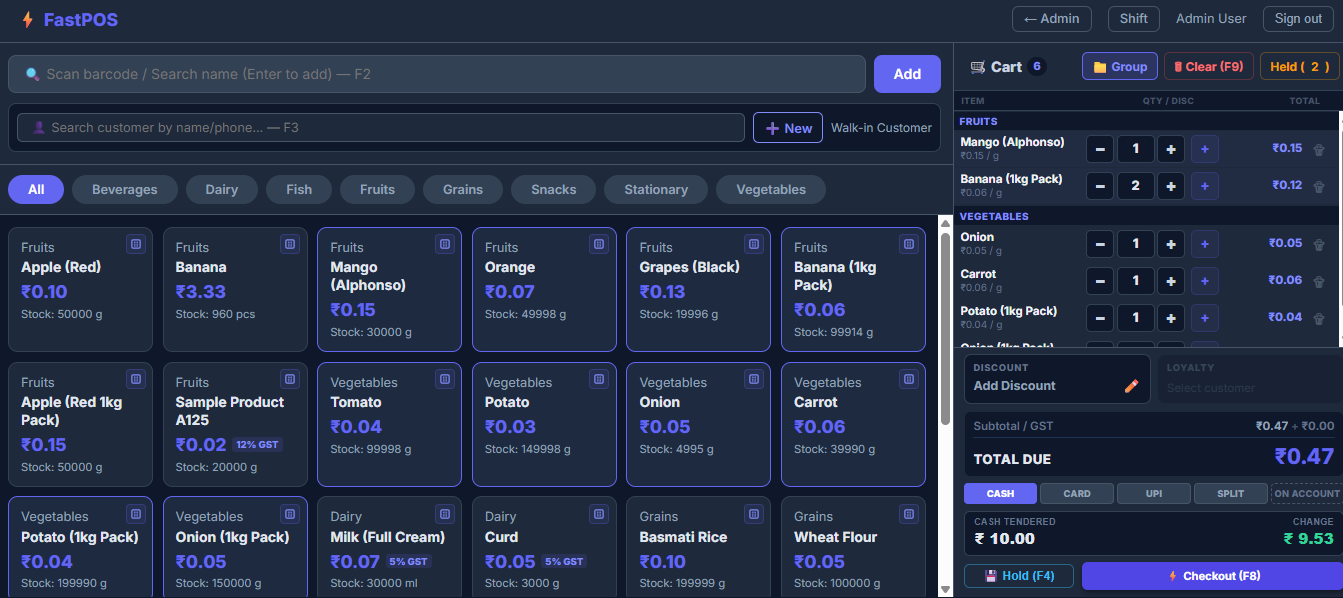
The FastPOS Sales Terminal Workspace
The core billing dashboard is engineered for high-volume retail transactions. FastPOS bypasses traditional server-side delay cycles by caching store catalogs and maintaining cart state on the client side using Alpine.js. Cashiers can perform lightning-fast searches, scan barcodes, update selling quantities, select active CRM customers, and apply line item discounts in sub-millisecond workflows.
Barcode Scanner Integration
Instantly appends product lines or increments current cart item counts on barcode input.
Reactive Cart State
Computes subtotals, taxes, per-item and order-level discounts locally in real time.
Multi-Unit & Price Factors
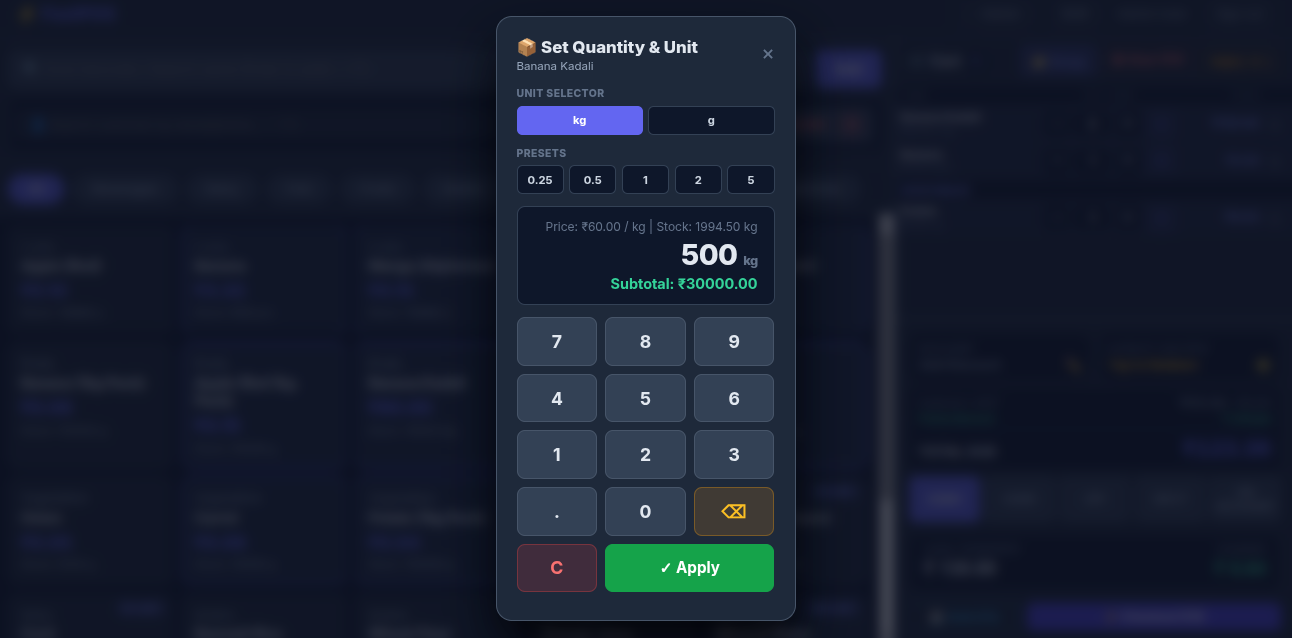
Dynamically switches product units (e.g. Kg to g) while converting unit prices instantly.
Line-Level Discount Adjustments
Apply flat price deductions or custom discount percentages on individual cart lines.
Tenant Isolation
1. Multi-Tenancy & Store Management
FastPOS is architected as a secure multi-tenant platform utilizing a shared-database approach. Every record is strictly scoped via a global BelongsToStore Eloquent trait. Store registration features automated bot defenses, automatic provisioning of initial business variables, and direct WhatsApp onboarding links.
Secure Registration & Captcha
Self-registration protected by honeypot fields and arithmetic math challenges.
Tenant Separation
Every database model enforces store scoping to guarantee complete isolation of business data.
Default Auto-Provisioning
Instantly configures default business settings, a GST 0% tax tier, and base printer setups.
WhatsApp Credentials
Generates pre-formatted WhatsApp share links to onboard store managers instantly.
Payment Processing
2. Flexible Checkout & Split Payments
Provide a premium billing experience supporting Cash, Digital, Split payments, and On-Account Customer Credit. Real-time loyalty points accumulation and redemptions integrate directly within checkout operations, executing securely in atomic database transactions.
Split Payments
Deduct balances using combinations of cash and digital payments simultaneously.
Customer Loyalty System
Configure custom loyalty earn rates. Redeeming points subtracts from the grand total instantly.
On-Account Credit
Assign transaction totals directly to a customer's open credit balance.
Order-Level Discounts
Apply overall invoice discount rates at checkout with validation guards.
Drawer Security
3. Shift Controls & Discrepancy Audits
Secure cashier drawer activity by enforcing active shifts. Cashiers are required to input starting cash drawer values before processing receipts. Shift termination computes expectations versus physical counts, printing detailed Z-Reports.
Shift Enforcement
Restricts terminal billing actions unless a shift has been successfully initiated.
Discrepancy Calculation
Auto-tracks differences between actual closing counts and Expected values.
Z-Report Generation
Prints cashier summaries highlighting cash, card, refunds, and discrepancies.
Active Session Lock
Limits cashier accounts to a single active shift at any given time.
Inventory Control
4. Catalog Management & Multi-Unit Conversions
Manage products, categories, and brands from a tabbed console. FastPOS records inventory in base units, but supports custom conversions (e.g., multiplying or dividing quantities) during transactions, ensuring granular precision.
Product CRUD Modals
Establish product records detailing cost, selling prices, tax profiles, and SKUs.
Low-Stock Reorder Triggers
Configures product-level thresholds that signal alerts when stock runs low.
Conversion Rules
Supports custom conversions with multiply/divide operators per product or globally.
Base Unit Storage
Maintains database stock balances in base units (e.g., g, ml, pcs) for calculation accuracy.
Data Operations
5. Transaction-Safe CSV Bulk Upload
Import thousands of product entries in seconds. The CSV parser handles upserts, converts unit labels into system base values, logs differences in inventory ledgers, and triggers database transaction rollbacks if syntax errors are hit.
Upsert Execution
Matches SKU or Barcode to update existing products or create new profiles.
Ledger Adjustments
Differences are logged as adjustments in the audit ledger rather than overriding balances.
Parser Rollback on Errors
Rolls back changes if any row fails, returning the exact row number of the failure.
Unit Parsing Engine
Automatically resolves strings (e.g. 'kg', 'dozen') into system base structures.
Stock Control
6. Purchase Logs & FEFO Batch System
Record stock purchases in custom units with automatic cost-price recalculation. FastPOS manages inventory batches via First-Expired-First-Out (FEFO) logic to ensure correct cost allocations and batch deductions.
FEFO Stock Deduction
Deductions target earliest expiring batches first. Null expiry items are treated as last.
Cost Price Tracking
Adjusts base costs dynamically when purchase cost prices fluctuate.
StockBatch Logs
Each purchase creates batch numbers, expiration records, and cost details.
Inventory Ledger Audit
Maintains records of adjustments, purchases, sales, and refund returns.
Configuration
7. Business Settings & Custom Tax Rates
Configure shop profiles, address blocks, GSTIN parameters, and receipt settings. Establish active tax rates and assign specific percentages to target product items.
Business Profile Setup
Manage names, physical locations, contact numbers, and currency symbols.
Tax Rate CRUD
Create, edit, or disable tax categories. Set default configurations for new products.
Loyalty Settings
Control system-wide loyalty toggles, points ratios, and minimum redemption rules.
Receipt Toggles
Optionally display or hide store tax numbers (e.g. GSTIN) on thermal prints.
Hardware Integration
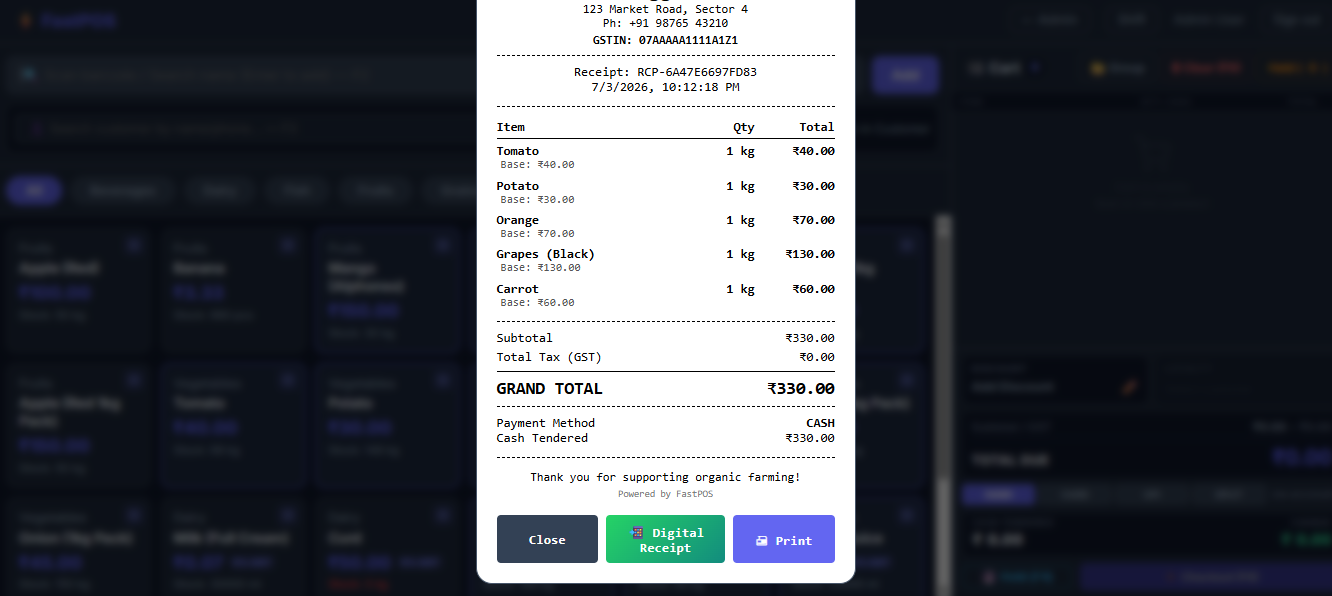
8. ESC/POS Thermal Receipt Printing
Print clean receipts supporting Standard A4, 80mm, and 58mm layouts. Cashiers can toggle print preview dialogs, and individual printer settings are saved per user profile.
80mm & 58mm Formats
Sizing formats optimize typography automatically for thermal printing.
Browser Preview Mode
Review formatted simulated layouts in-browser before outputting to printers.
Per-User Preferences
Saves printer settings for each cashier or terminal profile.
Dynamic Auto-Receipts
Generates unique receipt numbers (e.g. RCP-{UNIQID}) for every ticket.
Digital Dispatch
9. WhatsApp Digital Receipt Dispatch
FastPOS incorporates a fully managed WhatsApp bill sharing feature. It automates digital invoice delivery, saving receipt PDFs directly to cloud storage and messaging them to customers instantly.
Cloud Receipt Archiving
When checkouts are recorded, system engines compile the receipt as a PDF and upload it automatically to secure cloud storage buckets (AWS S3 or Firebase Storage).
Automated Delivery Methods
Supports direct, hands-free API routing via WhatsApp Cloud API or Wati for instant background delivery, as well as a free browser-redirect standard route.
Dedicated Print UI Panel
Integrates phone number input drawers directly next to fallback paper print buttons in the invoice preview dialog.
Quick Copy Link Option
Includes a fallback button allowing cashiers to copy the unique PDF invoice URL to clipboard for manual sharing anytime.
Dashboard Metrics
10. Performance Reports & Profit Analytics
Analyze sales indicators, transaction histories, and Profit & Loss statements. The reporting engine calculates COGS (Cost of Goods Sold) dynamically as Σ(qty_sold × cost_price) to deliver accurate gross and operating margins.
KPI metrics
Track total revenue, transaction counts, and profit margins over custom date periods.
Profit & Loss Log
Compiles purchase outlays against sales to compute net operating income details.
Refund & Return Processing
Process refunds directly from details panels, restoring stock and correcting shift sales metrics.
Export CSV Options
Download transactional and sales records as spreadsheets for auditing.
Administration
11. Customer CRM, Access Roles & Safety
Manage customers and account records through the admin panel. Enforce security constraints with Laravel Breeze authentication, role-based middleware guards, and DB-level row locks during concurrent checkouts.
Customer Credit Tracking
Track outstanding balances and process credit settlements from the admin console.
Role Middleware
Assign Admin or Cashier roles to restrict terminal billing access or settings views.
Race Condition Safeguards
Uses database row-locking (lockForUpdate) to prevent race conditions in high-volume stores.
Breeze Auth Integration
Bcrypt password hashing and CSRF validations safeguard system operations.